In most projects, seeing all tests pass must feels reassuring, for sure.
- The pipeline is green 🤩
- The coverage number looks decent ️🤔️
- The feature seems safe enough to merge 😁
But after working on a Django project, especially in authentication and voting feature, I started to realize that passing tests and high coverage do not always mean the test suite is actually strong. Code coverage only tells us which lines of code were executed during the test run, but it does not tell us whether the assertions were meaningful. A test can execute a line of code without truly validating its behavior.
This problem lead us to a situation where mutation testing becomes useful. Mutation testing asks a different question:
If the code was slightly broken, would my tests notice?
In this post, I will share how I used mutmut to evaluate the quality of tests in a Django project, how I narrowed the mutation scope, and how I identified which survived mutants were worth fixing.
So, What Is Mutation Testing?#

Talking about mutant, I remember someone from the X-Men universe: Magneto. He is a mutant with the power to control metal, and his presence usually forces everyone around him to react. I always admire him and his power, even if he’s on the bad side.
Ehem, anyway..
In a very different and much less dramatic way, mutation testing also introduces “mutants” into our codebase to see how our test suite reacts. If the tests can detect and stop the mutant, that is a good sign. If the mutant survives, then maybe our tests are not as strong as we thought.
For example, mutation testing may change this:
if start_time <= now <= end_time:
    allow_vote()
into this:
if start_time < now <= end_time:
    allow_vote()
At first glance, the change looks small. But behaviorally, it is important. The original code allows voting exactly at start_time, and the mutated code rejects voting exactly at start_time.
If the test suite fails after this mutation, the mutant is killed. That means the tests successfully detected the broken logic. If the test suite still passes, the mutant survives. That means the tests did not catch the behavioral change. In simple terms, killed mutant is a good sign but survived mutant can introduce a possible testing gap.
However, not every survived mutant is automatically a problem. Some mutants are low-value, equivalent, or not worth killing because they do not change meaningful behavior. That is why mutation testing still needs human judgment.
And for this case, I will using mutmut, a mutation testing tool for Python. I chose mutmut because it is relatively simple to use with a Django project and works well with a pytest-based test suite.
Setting Up Mutmut in Django#
To start with mutmut, we will need to configure it inside the setup.cfg file. A simplified mutmut configuration can look like this:
[mutmut]
paths_to_mutate=authentication/,voting/
runner=python -m pytest authentication/tests voting/tests -q --tb=short
tests_dir=.
For my case, to separate the configuration from the other mutation test conducted by my team, I will configure the config in setup.auth-voting.cfg file like this:
[mutmut]
paths_to_mutate=
    authentication/xxx  # selected files in authentication module
    voting/xxx # selected files in voting module

pytest_add_cli_args_test_selection=
    authentication/tests/xxxx # selected test files in authentication module
    voting/tests/xxxx # selected test files in voting module

also_copy=
    authentication/
    voting/
    # and other modules
    manage.py
    pytest.ini

backup=False
debug=false
We can configure the mutation testing as free as we want, but the most important part about the configuration is choosing the right mutation target. We need to make sure that the paths_to_mutate should point to the application code, not the test files.
In my case, I narrowed the scope to authentication and voting because those modules had the most important logic related to access, validation, and user actions. This will made the result easier to analyze.
First Try: Uhh.. What?#
At first, the mutation result came in too noisy.
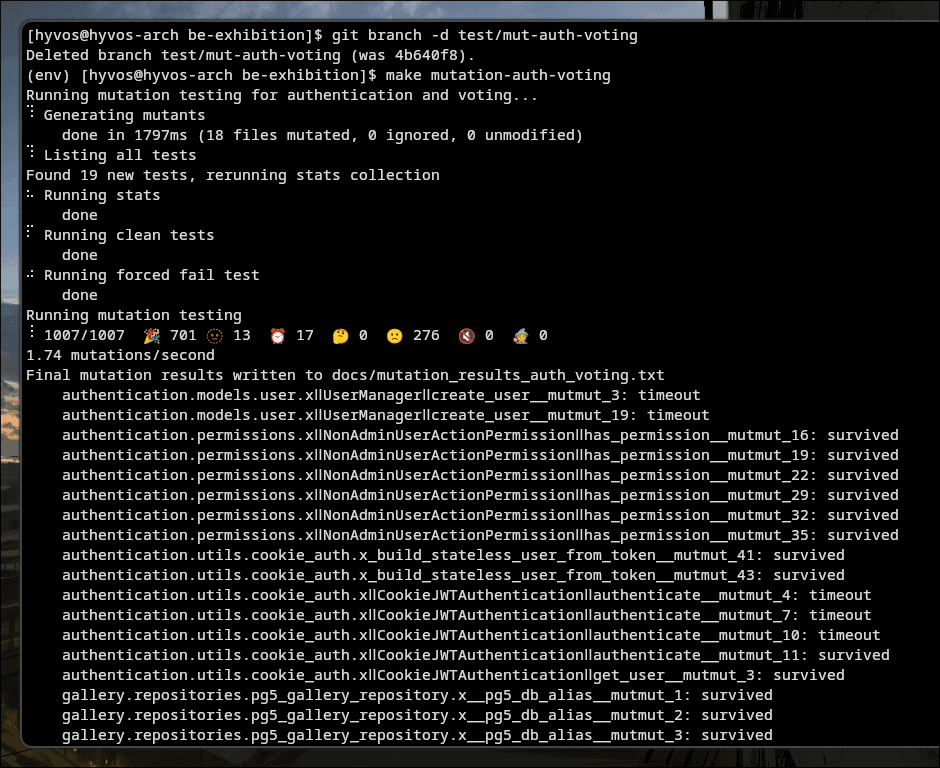
The run produced 306 problematic mutants, consist of 276 survived mutant, 15 timeout process, and 13 no tests mutants. We can ignore the timed out mutant since this is most likely a device issue, while the no tests mutant can be fixed with adding more test to the related lines of code. But what about other 276 survived mutants?
Somehow after a careful analysis, I just realized that comment and gallery feature is also included in the mutation test. Since we are gonna focus on the Authentication and Voting feature, I decided to remove them from the config file.
After fixing my setup configuration file, the result became much healthier:
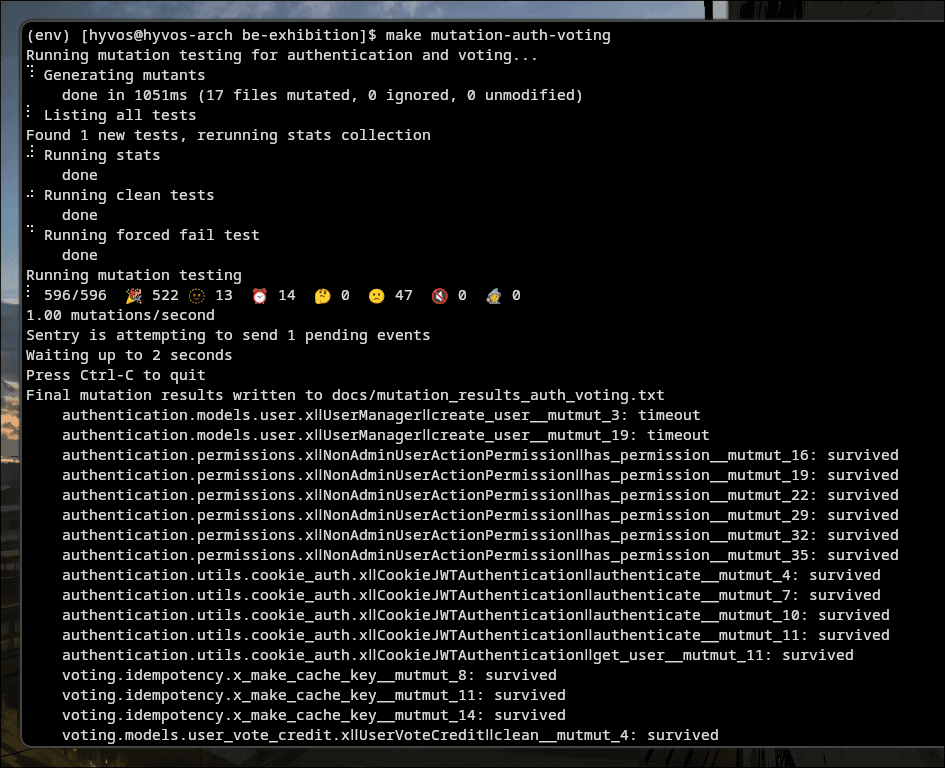
This was still not perfect, but it was much easier to analyze. More importantly, after a careful analysis, it also helped me to easily separate survived mutants into two categories, mutants that are not really worth killing and mutants that reveal real weaknesses in the test suite.
The two examples below will show the difference.
Example 1: Low-Value Mutant in Authentication Error Message#
The first survived mutant came from the authentication module. Mutmut reported this mutant:
authentication.utils.cookie_auth.xǁCookieJWTAuthenticationǁget_user__mutmut_11: survivedThe original code was:
raise AuthenticationFailed("User not found", code="user_not_found")And mutmut changed it into:
raise AuthenticationFailed("XXUser not foundXX", code="user_not_found")At first, this looks like a survived mutant that should be fixed. But after checking the test, I found that the test was validating the stable machine-readable error code:
context.exception.detail.code == "user_not_found"In this case, we don’t have to check whether the exact wording of the error message is correct or not. The important thing that we need to test is that a JWT for a missing database user is rejected with:
code="user_not_found"If the message changes from User not found to Account does not exist, the authentication behavior is still correct. Trying to kill this mutant by asserting the exact error message would make the test more brittle without improving the actual security or behavior of the system.
So for this case, I decided that this survived mutant was acceptable.
Example 2: True Mutant in Exhibition Active Window#
The second example was much more important. Mutmut reported this survived mutant:
voting.services.base_vote_service.xǁBaseVoteServiceǁ_ensure_exhibition_active__mutmut_10: survivedThe original code checked whether the exhibition was ongoing and whether the current time was inside the active voting window:
if exhibition.status != Exhibition.Status.ONGOING or not (start_time <= now <= end_time):Mutmut changed it into:
if exhibition.status != Exhibition.Status.ONGOING or not (start_time < now <= end_time):This looks like a tiny change, but it changes the business rule where the original code says that voting is allowed when start_time <= now <= end_time. This means the active window is inclusive. So if the current time is exactly equal to start_time, voting should be allowed.
But the mutant changed the lower boundary into start_time < now. Now, if now == start_time, voting would be rejected. And because the mutant survived, it means the current tests did not check the exact lower boundary.
The tests probably covered cases like voting before the exhibition start, after the exhibition ends, and during the exhibition. But they missed this exact boundary case, where now == start_time. You can call this a classic Boundary Value Analysis gap.
To kill this mutant, I added two boundary tests in test_base_vote_service.py. The first test freezes timezone.now() so that now == start_time, then verifies that _ensure_exhibition_active() does not raise ExhibitionNotActiveError. The second test does the same for the upper boundary, where now == end_time.
# Left boundary
def test_ensure_exhibition_active_allows_exact_start_time_boundary(self):
    fixed_now = timezone.now()
    self.exhibition_course.exhibition.status = Exhibition.Status.ONGOING
    self.exhibition_course.exhibition.start_time = fixed_now
    self.exhibition_course.exhibition.end_time = fixed_now + timezone.timedelta(hours=1)

    with patch("voting.services.base_vote_service.timezone.now", return_value=fixed_now):
        self.service._ensure_exhibition_active(self.exhibition_course.exhibition)

# Right Boundary
def test_ensure_exhibition_active_allows_exact_end_time_boundary(self):
    fixed_now = timezone.now()
    self.exhibition_course.exhibition.status = Exhibition.Status.ONGOING
    self.exhibition_course.exhibition.start_time = fixed_now - timezone.timedelta(hours=1)
    self.exhibition_course.exhibition.end_time = fixed_now

    with patch("voting.services.base_vote_service.timezone.now", return_value=fixed_now):
        self.service._ensure_exhibition_active(self.exhibition_course.exhibition)
With these new tests, the suite now clearly documents the intended business rule.
The After Fix: Killing Mutants!#
After analyzing other survived mutants and applying some fixes, I reran mutmut and compared the result with the previous run.
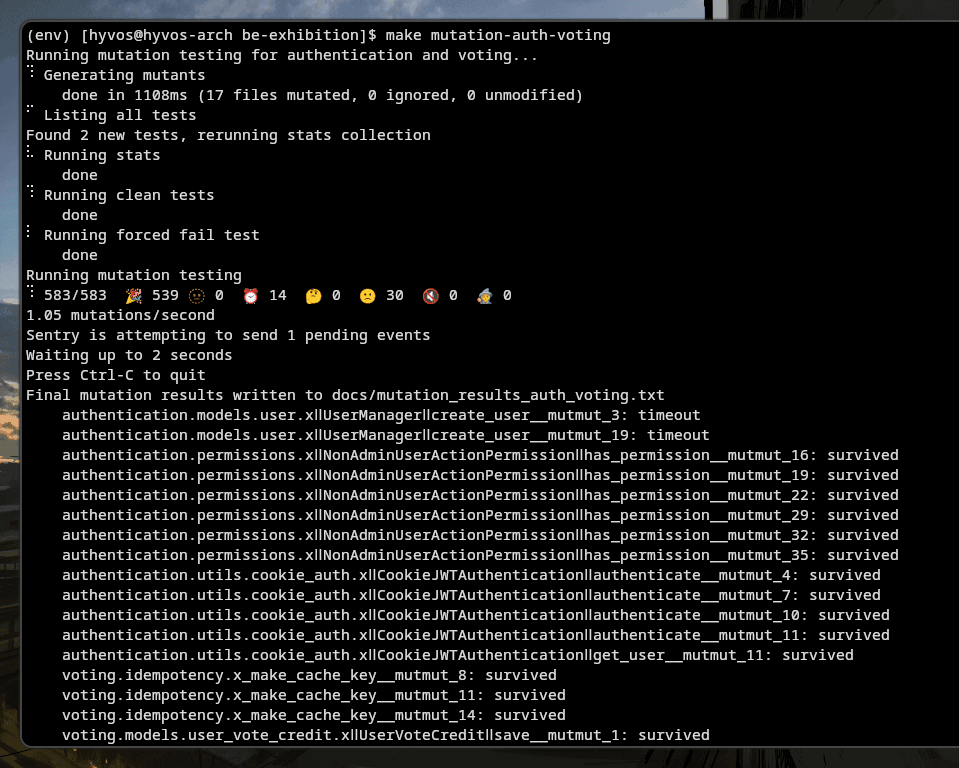
Surviving mutants are reduced into 44 total, including 14 of timed out process and only 30 survived mutants are left. I decided that the other 30 are a low-value mutant and is not necessary to be fixed. There was succesfully 17 survived mutants that was killed by the fixes and 14 no tests anomaly were given care by me.
Conclusion#
The biggest lesson from this experiment is that mutation testing should not be treated as just another score to maximize. Some survived mutants, like the authentication error message mutation, may be acceptable because they only change presentation details. Others, like the exhibition boundary mutation, reveal real gaps in the test design.
This also reminded me about what we discussed in the beginning, that relying only on code coverage can create a false sense of confidence. Coverage can show that a line of code was executed, but it cannot prove that the test has a meaningful assertion or that it would catch broken logic. Mutation testing helps fill that gap by challenging the test suite with small intentional changes and checking whether the tests actually react.
For me, mutation testing with mutmut helped complete what code coverage could not answer: coverage asks, “Was this code executed?”, while mutation testing asks, “Would the tests fail if this code was wrong?” That second question is important, especially for critical Django logic such as authentication, validation, permissions, and voting rules.
So the next time your coverage report looks green, try asking one more question: would the tests still catch the bug if the code was slightly wrong?
Happy testing! 🥳